Introduction
Cloud environments do not stay still. Identities join and leave, workloads spin up and down, accounts multiply across regions, and data gets reclassified overnight. Role-based access control, built for stable job functions, struggles to keep pace.
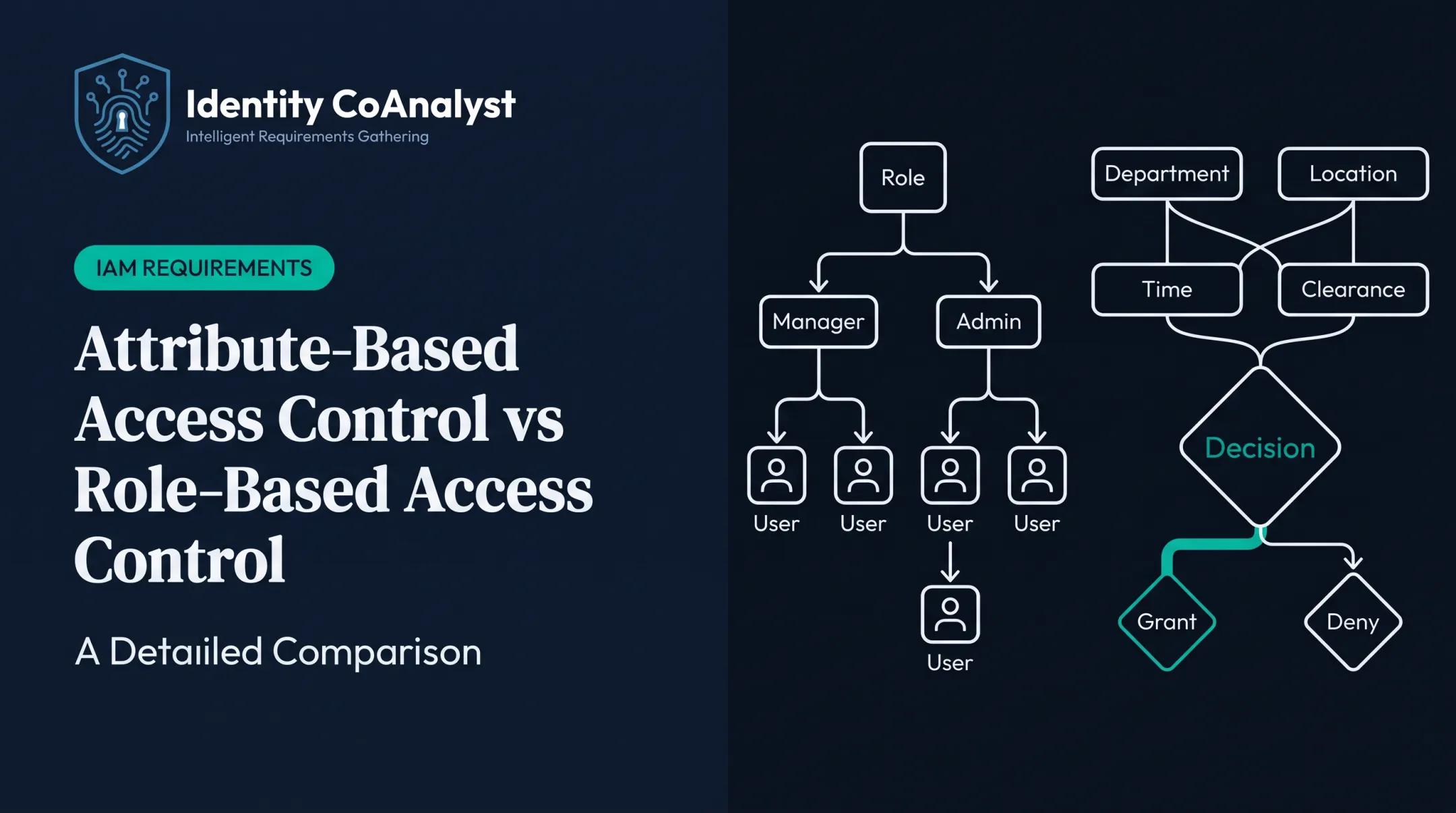
NIST warns that role-based systems don't easily support decisions that combine shifting factors like location or training. That pushes teams toward creating narrow, one-off roles for every edge case, a pattern NIST calls "role explosion."
Attribute-based access control (ABAC) takes a different approach. Instead of granting access by job title alone, it evaluates attributes about the requester, the resource, the action, and the surrounding context before deciding.
This article covers where ABAC earns its complexity in cloud security, how it relates to RBAC, what AWS actually supports, and the attribute governance that determines whether ABAC works or backfires.
Key Takeaways
- ABAC evaluates identity, resource, action, and environmental attributes together, instead of relying on job roles alone
- Highest-value cloud use cases: tag-based access, temporary privilege, workload authorization, and tenant isolation
- Most teams keep RBAC for baseline permissions and use attributes for dynamic conditions
- Accurate, consistently named, centrally governed attributes determine whether ABAC succeeds
What Is ABAC and How Does It Work?
ABAC is an authorization model, not an authentication one. Authentication confirms who someone is. Authorization decides what that already-verified identity can do. ABAC handles the second half by weighing attributes across four categories before granting, denying, or conditioning a request.
The Four Attribute Categories
- Subject attributes — department, employment status, security clearance, workload identity, or managed-device status
- Resource attributes — data classification, owner, project, environment, account, region, or resource tags
- Action attributes — read, write, delete, deploy, assume-role, invoke, or configuration change
- Environment attributes — time of day, network zone, device posture, authentication strength, or risk signal

A cloud policy engine pulls these attributes at request time and checks them against policy. It returns a decision: allow, deny, or allow-with-obligation, such as forced MFA or mandatory logging. An enforcement point then carries out that decision.
A Simple Policy Example
Picture a developer trying to modify a cloud resource. A workable ABAC rule might allow the action only if:
- The resource is tagged for that developer's specific project
- The environment tag reads "non-production"
- The request originates from an approved, federated identity
Miss any one condition, and the request gets denied automatically. No new role required.
Why Attribute Quality Determines Everything
None of this works if the underlying data is wrong. A Workday HR record showing Employment_Status: Active for someone who left last month grants access that should have disappeared. A missing resource tag can silently deny the right request, or worse, silently allow the wrong one.
Common sources feeding ABAC decisions include:
- HR platforms (employee type, department code, clearance level)
- Identity providers (federation claims, group membership)
- Cloud resource tags (project, environment, classification)
- Ticketing and change-management systems (approval status)
Stale or inconsistent attributes don't just create security gaps. They create operational friction when legitimate work gets blocked. Treat attribute governance as a prerequisite, not an afterthought.
Key ABAC Use Cases in Cloud Security
ABAC is worth the complexity when access depends on shifting context: resource metadata that changes, business conditions that don't map to a job title, or exceptions that would otherwise spawn a new role every time. The six use cases below are where cloud teams see the clearest return.
Data and Resource Access by Classification
Sensitive cloud storage, databases, and analytics platforms rarely need a blanket "allow" or "deny." They need conditional access based on who's asking and what they're asking for.
A typical policy combines security clearance, department, data classification, project assignment, and requested action. For example: approved team members can read confidential project data, but downloads, deletions, and access from unmanaged devices get blocked outright, regardless of who's asking.
This mirrors PCI-DSS Requirement 7, which mandates need-to-know access to cardholder data with a default deny-all posture. ABAC operationalizes that requirement instead of leaving it as a policy document nobody enforces.
Environment Separation and Tag-Based Resource Governance
Resource tags let a single policy distinguish development, test, and production without maintaining separate role sets for each. A tag like environment:production combined with an action like delete can trigger stricter conditions automatically.
This only holds up with tag discipline:
- An approved, documented tag vocabulary
- Clear tag ownership (who can create or change tags)
- Protection against unauthorized tag edits
- A deny-by-default fallback when a required tag is missing
Skip any of these, and a mistagged or untagged resource becomes either an accidental open door or a support headache.
Temporary and Privileged Cloud Access
Standing administrative access is a liability lying in wait. ABAC supports just-in-time access tied to ticket status, approval state, device posture, and session duration instead.
A documented pattern looks like this: a change request grants temporary production database administrator access for four hours, then automatic revocation kicks in with no manual cleanup required.
High-risk actions, like disabling logging or modifying network controls, warrant tighter conditions than routine administration—such as a second approver or emergency-only justification.
Workload, API, and Machine-to-Machine Authorization
Not every identity making a request is human. Service accounts, deployment pipelines, and APIs need authorization too, but granting every workload a broad static role defeats the purpose.
ABAC evaluates workload identity, deployment pipeline, source environment, and target resource together. A production payment service, for instance, might be allowed to invoke only its approved billing API and read only the transaction data required for its function, nothing else.
Non-human accounts also need clear ownership. When a service account's owner field is blank, review should escalate automatically, to an IT security manager, for example, instead of being skipped.
Multi-Account, Multi-Region, and Multi-Tenant Governance
Attributes like account ID, tenant ID, region, and business unit reduce cross-boundary access risk in ways static roles cannot. This matters most in SaaS environments serving multiple customers from shared infrastructure.
AWS documents a tenant-isolation pattern for SaaS platforms: a tenant ID gets embedded in a JWT, carried through STS session tags, and checked against aws:PrincipalTag in the resulting IAM policy.
That means a support engineer's session credentials are scoped to a single tenant's resources by design, not by convention.

Independent validation of tenant attributes matters here. A compromised or misconfigured process shouldn't be able to claim access to another customer's data just by presenting a plausible-looking tag.
Compliance, Separation of Duties, and Auditable Access
Regulated workloads often require documented approval chains and hard separation between conflicting duties. ABAC can enforce both as policy conditions rather than trusting manual review.
Two patterns show the range:
- Hard block, no exceptions: SOX conflicts like "Purchase Requestor" and "Purchase Approver" held by the same person
- Soft block with escalation: a "Developer" also holding "Production Administrator" access, allowed only with CTO approval and a 90-day limit under enhanced monitoring
Federal workloads add frameworks like FISMA, FedRAMP, and NIST 800-53's access control family, plus Zero Trust mandates under EO 14028. None of these frameworks treat ABAC as a compliance guarantee on its own. It's an enforcement mechanism that still needs governance, testing, and audit trails behind it.
How to Implement ABAC in a Cloud Environment
Don't try to model every identity and resource on day one. Start narrow: pick one sensitive application, data store, account boundary, or privileged workflow where access risk is measurable and the payoff is obvious. Before you touch policy syntax, capture the business rules and attribute sources that will drive those controls.
Plan Requirements Before Configuration
The step teams skip most often is capturing business rules, access exceptions, attribute sources, and approval paths before opening a policy console. A single contractor-access requirement, for example, can touch an HR system of record, three applications, an approval chain, and a certification cadence. Every one of those pieces needs to be documented somewhere.
This is the gap Identity CoAnalyst was built to close. It's a vendor-agnostic requirements-gathering platform that walks stakeholders through structured, plain-language questions across IAM, IGA, and PAM domains, then generates implementation-ready documentation from the answers.
It doesn't configure policies or replace your cloud provider's IAM engine. It produces the requirements baseline that engine gets built against.
Define the Attribute Model and Authoritative Sources
Build an attribute catalog before touching policy syntax. For each attribute, document its meaning, format, owner, source system, and freshness requirement. Common sources include HR systems, identity providers, cloud resource tags, CMDBs, device-management tools, and ticketing platforms.
Establish Policy Architecture and Guardrails
Map out policy administration, decision, information, and enforcement points using your cloud's native IAM policies, service control mechanisms, and API gateways. Non-negotiables:
- Deny-by-default with explicit allow conditions
- Immutable, protected audit logs
- Documented emergency-access (break-glass) procedures
- Separation between who writes policies and who approves them
Test, Simulate, and Roll Out Gradually
Run policy unit tests and simulate new rules against historical access logs before enforcing anything live. Include negative tests aimed at privilege escalation paths.
Roll out in phases:
- Monitor-only mode first
- Limited enforcement on the pilot scope
- Broader deployment once results look clean
- A documented rollback path for legitimate access that gets wrongly blocked

Monitor Decisions and Maintain Attributes
Watch for these signals after go-live:
- Denied-request spikes and policy conflicts
- Missing attributes and stale identities
- Unexpected resource access patterns
Every access decision should trace back to the exact policy version and attribute values used at the time. Keep sensitive attribute data out of plain-text logs.
ABAC vs. RBAC in Cloud Security
RBAC is simple: assign a role, inherit its permissions. That simplicity works well for stable job functions where access doesn't change week to week. It breaks down when every project, environment, region, or device state needs its own role: the role explosion problem again.
Signs you've hit role explosion:
- Separate roles for every project-environment combination
- Roles created for one-time or temporary assignments
- Duplicate roles that differ only by region or account
ABAC expresses these conditions as attributes instead of new roles. A single policy checking project tag, environment tag, and device posture can replace a dozen narrowly-scoped roles.
The Hybrid Approach Most Teams Actually Need
Few organizations need to rip out RBAC entirely. A practical split:
- RBAC for baseline entitlements tied to job function
- ABAC conditions layered on top for resource sensitivity, environment, device posture, time limits, and tenant boundaries
What AWS Actually Supports
AWS is often mislabeled as one model or the other. AWS IAM documentation describes the traditional authorization model as role-based, with attribute and tag-based conditions available as an additional layer.
Condition keys like aws:ResourceTag and aws:PrincipalTag let a single policy govern access dynamically as tags change, without rewriting the policy for every new resource.
Quick Decision Guide
| Factor | Favors RBAC | Favors ABAC |
|---|---|---|
| Identity/resource volatility | Low | High |
| Organization size | Small | Large, multi-account |
| Attribute data maturity | Limited | Well-governed |
| Compliance complexity | Basic | Regulated, multi-framework |
Challenges and a Practical Adoption Checklist
ABAC's flexibility comes with real operational cost. The main risks worth planning for:
- Complex, hard-to-explain policy logic
- Attribute sprawl across too many source systems
- Stale or conflicting data feeding decisions
- Tag tampering or unauthorized tag changes
- Performance overhead from attribute lookups
- Legitimate work accidentally denied
Cloud deployments add failure modes on top of those structural risks:
- A resource silently losing its required tag
- A terminated employee whose claim hasn't been revoked yet
- A compromised workload presenting an overly broad identity
- A policy that behaves differently across regions than expected
Readiness Checklist
- Identify one priority use case with measurable access risk
- Inventory authoritative attributes and confirm their sources
- Assign explicit policy and data owners
- Map every enforcement point in the request path
- Test policies against historical logs before enforcing
- Establish protected, immutable decision logging
- Pilot narrowly, then expand only after review

Keep the attribute set small at first. Standardize naming early; retrofitting naming conventions across a live policy set is far harder than starting clean.
Frequently Asked Questions
What is attribute-based access control (ABAC) and how does it work?
ABAC grants or denies access by evaluating attributes about the subject, resource, action, and environment against policy rules. Instead of one static role, it checks live conditions at the moment of the request.
What is the difference between RBAC and ABAC, and when should you use each?
RBAC assigns permissions by job role and suits stable functions well. ABAC evaluates dynamic context like resource tags or device posture, which suits cloud environments with frequent change. Most teams benefit from combining both.
What is an example of ABAC?
A developer can modify a resource only if it's tagged for their project, the environment is non-production, and the request comes from an approved identity. Any missing condition results in a denial.
Does AWS use ABAC or RBAC?
AWS supports both. Its traditional IAM model is role-based, while tag and condition-based policies provide attribute-driven control. Check current AWS IAM documentation for implementation specifics.
What are the main benefits of ABAC in cloud security?
ABAC delivers fine-grained least privilege, fewer roles to maintain, context-aware decisions, and clearer audit trails. It doesn't automatically guarantee regulatory compliance on its own.
What are the main challenges of implementing ABAC in the cloud?
The main challenges are policy complexity, attribute accuracy, tag governance, and integration across source systems. ABAC also needs ongoing testing and maintenance, not a one-time setup.